













Key features
Four things that make bank reconciliation slow, and how LedgerMatch handles each one.
Your bank data, ready to match


Connect the account and LedgerMatch reads the statement for you: the columns, the dates, the amounts. What used to take days takes minutes.
- Reads columns, dates and amounts on its own: nobody maps a statement export by hand before the work can start.
- Turns a messy statement into clean, ready-to-match data: formats, currencies and references are lined up, and your original records stay exactly as they were.
- Almost nothing to set up by hand: the work that used to happen before reconciliation starts is already done.


Smart matching against your bank
Match deposits to what you were owed using rules you set, with AI alongside to catch the ones your rules would miss.
- Rules you control, in the order you want: the amount, the date window and the reference, each with a tolerance you decide.
- Three things have to agree, never the date alone: which is what stops a late deposit being reported as missing money.
- AI that gets sharper the more you use it: it proposes rules from your own data, and your team approves them before anything runs.
One deposit, many sales


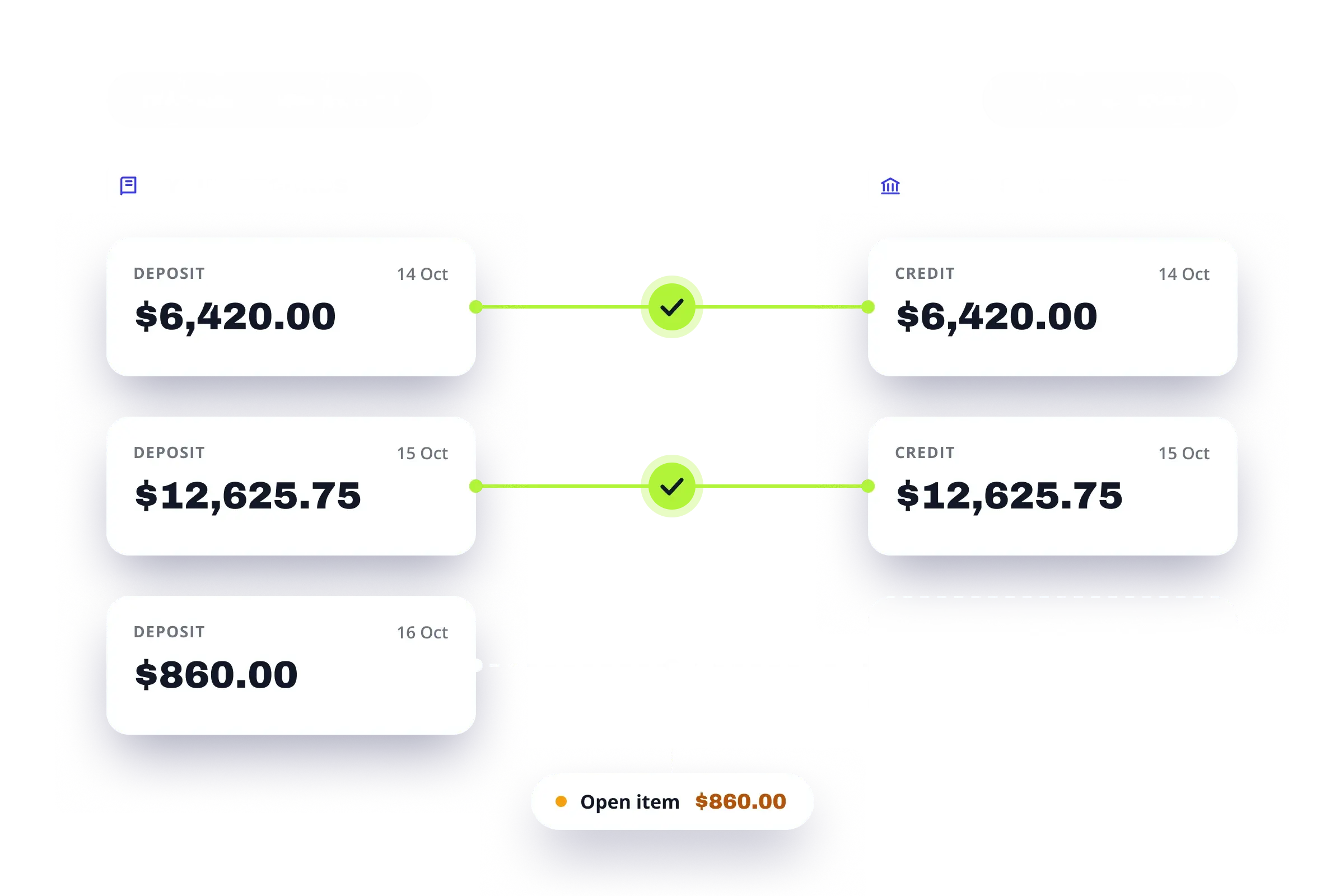
Card processors pay out in batches, so a weekend of trading can arrive as a single Monday credit. Done by hand, this means adding up sales until the total happens to match.
- Grouped automatically: the sales that funded together are matched to the one deposit that paid for them.
- Still itemized: open any deposit and see every sale inside it, with its own date and amount.
- Weekends handled: a Friday to Sunday run landing on Monday is treated as normal, not as a problem.


When the deposit is smaller than the sale
A fee comes off the top. A refund is netted out of the same payout. The deposit is short, the sale was real, and nothing is actually wrong. It still has to be explained.
- Fees matched to the payout: the processing cut is tied to the deposit it came out of, not left over at the bottom of the file.
- Refunds and chargebacks: a netted refund is tied back to its sale, and a chargeback is flagged as an item to book.
- Small differences clear themselves: rounding inside your tolerance clears automatically, anything larger waits for a person.
What automated bank reconciliation does
Three things change once the matching runs on its own.

Connect once, then it runs on its own
Right now someone exports a report, opens a spreadsheet and lines up two columns by hand.
Your card batches and your bank deposits already exist as records. LedgerMatch reads both and applies the same rule to every line. Nothing gets typed twice, and there is nothing to assemble at month end.

You work the exceptions, not the whole month
Matching is not where the hours go. They go to the handful of lines that do not match, and to chasing the documents that would explain them.
LedgerMatch clears the matches on its own and hands you the short list. Each item comes with its cause and the document that would close it.

A number your auditor can re-run
A reconciliation that looks clean is not evidence that it is. A rounding difference, a forced total, a day that got skipped. None of it announces itself.
Automated matching reaches the same answer every time, on the same rule. Every figure traces back to the record it came from.
Why finance teams choose LedgerMatch
Faster, more accurate, and built to keep working as you grow.

Your bank reconciliation is done before you sit down to do it
LedgerMatch matches deposits against what you were owed as they arrive, so there is no month end pile waiting for you. The reconciliation is already finished. You are only reviewing it.
Three days of bank reconciliation becomes an hour of decisions
Every deposit that ties clears on its own. Your team never opens the bank statement to work down it line by line, because LedgerMatch hands them only the payments that did not match, each with its reason attached.

Nothing gets forced to balance
A person matching a thousand bank lines eventually rounds something, or nudges a figure until the column agrees. LedgerMatch matches on the amount, the date window and the reference together, and where the two sides genuinely differ it says so instead of closing the gap.

The deposit that never arrived, found this week instead of next quarter
A payout that settles and then never funds is invisible on a bank statement, because nothing is there to notice. LedgerMatch flags it the day it passes the funding window, while the processor still has the records and someone still remembers the batch.

Reconciliation that does not get harder as you grow
Manual reconciliation costs you more every time the business grows. Twice the deposits is twice the hours, and at some point that becomes a hire. LedgerMatch works the same at four hundred deposits a day as it does at ten, so growth stops adding to the month end.

Your accounting software does not change
LedgerMatch runs alongside whatever you already use. It reads your bank, does the matching, and hands you the result. Nothing is posted to your books and no money can be moved, so there is nothing to migrate, nothing to roll out, and nothing to undo.
How bank reconciliation works in LedgerMatch
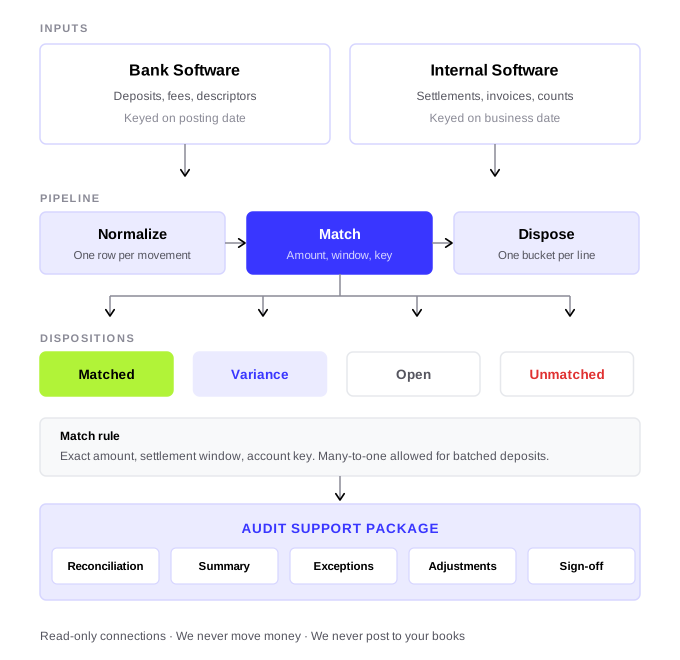
Two sources in, four outcomes out, one package at the end.
Connect the bank
Read only access to your bank and to the system that records what you were owed. More than 12,000 US banks are supported. No files emailed, no passwords shared.
Match against the rule
Both sides are rewritten as one row per movement, then matched on exact amount, settlement window and account key. Many deposits to one credit is allowed, so a batched payout still ties.
Work the exceptions
Every line lands in one of four buckets, so nothing sits in an unnamed pending pile. Each exception arrives with its cause and the document that would close it.
Produce the package
One click returns five sheets in the order an auditor reads them, with every figure traceable back to the bank feed or your own records.
Security and compliance built into every bank connection
Enterprise-grade encryption for bank data
All bank and settlement data is encrypted in transit and at rest to prevent unauthorized access at every stage.
Role-based access to bank accounts
Granular permissions ensure users only see and manage the bank accounts they are authorized to access.
Full audit trails on every reconciliation
Every action is logged and traceable, providing full visibility for audits and internal reviews.

Secure infrastructure and account isolation
Isolated environments and secure infrastructure protect sensitive bank data across teams and entities.
Frequently asked questions
